Architecture Overview
Mental model, complete lifecycle, design decisions.
GD is a signal-driven actor model. Each Service owns private state and communicates externally only through Qt Signals. The UI layer may be replaced at any time (desktop vs Android), but Service behavior should not change. Dependencies are one-way: UI → Services → Models ← Features. Reverse references would couple Services to a specific UI framework.
Source code: app/services/, app/models/, features/.
Components
| Component | Responsibility | Source file |
|---|---|---|
| CoroutineRunner | Qt↔asyncio bridge; all async work runs on its thread | app/common/coroutine_runner.py |
| TaskService | Task queue, state machine, scheduling, persistence | app/services/task_service.py |
| FeatureService | FeaturePack loading (topological sort), parser chain, identity preset injection | app/services/feature_service.py |
| BrowserService | Extension WebSocket communication, pairing, Task snapshot push | app/services/browser_service.py |
| SpeedMeter | Global speed aggregation (once per second), global speed limit | app/services/speed_meter.py |
| Aria2RpcServer | Aria2 RPC protocol compatibility layer | app/services/aria2_rpc_server.py |
| CategoryService | Automatic download directory categorization by file type | app/services/category_service.py |
CoroutineRunner uses a separate thread instead of embedding asyncio in the main thread, avoiding UI jank caused by heavy network I/O blocking the main thread. Task snapshot push performs a full string comparison once per second. The Task list is small (dozens to hundreds of entries); incremental tracking would require ten times the code of a full comparison, which is not worth it.
Complete Lifecycle of a Task
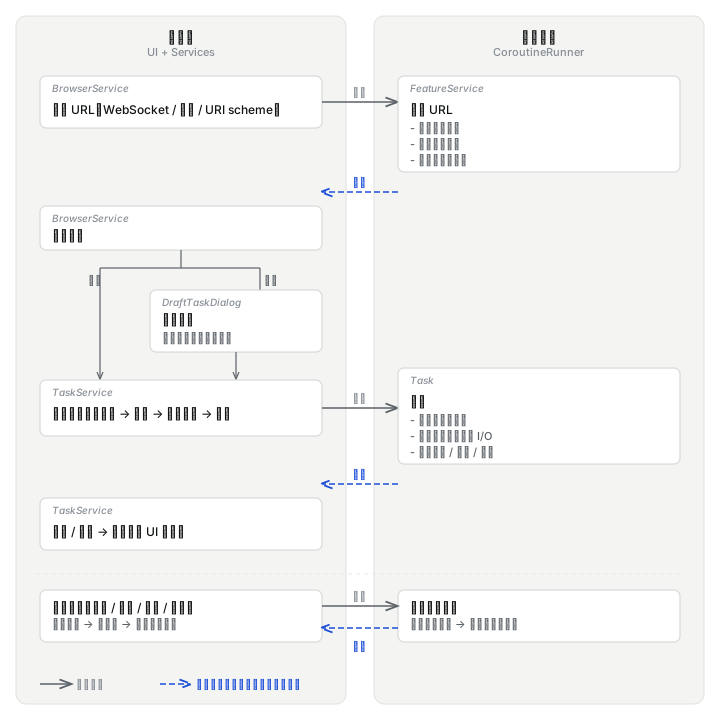
From URL to Task
No matter where the URL comes from, it goes through the same pipeline: parse → enqueue → schedule → execute. The difference is only the entry point.
The extension sends a download request
The user clicked a download button in the browser (or triggered download interception). The extension sends a request over WebSocket, carrying the URL, request headers, and resource metadata.
WebSocket rather than Native Messaging. Cross-platform, convenient, stable. Native Messaging requires a separate host manifest and platform-specific registration for each browser. WebSocket works through a single port.
Desktop-side parsing
The desktop side iterates over all parsers by priority. The first parser that can handle this URL takes over and creates a Task.
If the URL matches an identity preset (for example, a Bilibili domain) and the request does not carry a client fingerprint, the preset fingerprint configuration is automatically injected before parsing.
Draft confirmation or direct enqueue
Two conditions determine whether a confirmation window is shown:
- The
draftparameter in the extension request - The "Confirm before download" option in user settings
When both are false, the Task is enqueued directly. Otherwise, a confirmation window appears; the user selects a format, checks files, and confirms the path before enqueueing.
The confirmation result is returned to the extension over WebSocket: created / entered draft / parse failed.
Enqueue
Filename deduplication
Check three locations for files with the same name: the Task list in memory, actual files on disk, and progress files on disk. On conflict, append suffixes such as (1), (2).
Progress files are checked too; otherwise they would collide with running Tasks.
Category and disk check
If automatic categorization is enabled, assign a download directory by file type. Check whether the target disk has enough free space.
Enter the waiting queue
The Task is appended to the tail of the waiting queue. The scheduler checks the concurrency count and, when a slot is available, immediately submits it to the async thread for execution.
Execution
Tasks execute one Step at a time in order. A Bilibili video Task usually has three Steps: download video track, download audio track, FFmpeg muxing. Each Step independently manages its own network connection, progress, and error recovery.
The Step iterator re-checks the Task state each time before fetching the next Step. If the previous Step failed and the Task state becomes FAILED, iteration terminates immediately and does not attempt subsequent Steps. Output files of completed Steps remain on disk.
For the download mechanism inside Steps (slicing, acceleration, resume), see Download Engine. For the full communication pipeline from the browser extension to the desktop side, see Browser Bridge.
Pause and Resume
Pausing cancels the running async task, marks all unfinished Steps as paused, and keeps progress files on disk.
On resume, the Task is re-enqueued. Completed Steps are skipped; failed Steps start over (progress cleared); paused Steps continue from the position saved in the progress file.
The pause behavior during process exit is different: it only changes the state, not cancels the async tasks. The cost of cancelling them one by one is higher than directly ending the process; the async tasks are destroyed with the process.
Errors and Failures
Temporary errors inside a Step (network timeout, connection drop) are retried by the Step itself (wait 5 seconds, then reconnect). Permanent errors (HTTP 403/404, fatal I/O errors) abort the Step directly.
After a Step fails, the Task is marked as failed. When the user manually restarts it, the Task is re-enqueued. Completed Steps are skipped; failed Steps have their progress cleared and execute from the beginning.
Modification Operations
Edit, re-download, selection change, and delete all follow the same pattern: cancel the run first, wait for cancellation to finish, then perform the subsequent action.
The callback timing depends on whether the Task is running: running → the callback fires after the async thread finishes cleanup (next event-loop turn); not running → the callback fires immediately within the current call stack. Cancelling a running Task requires waiting for the async thread to respond; cancelling a not-running Task has no async work to wait for.
| Operation | What happens after cancellation |
|---|---|
| Edit | Replace parameters (URL, request headers, fingerprint, etc.), Task ID unchanged → reschedule |
| Re-download | Delete output files and progress files → reset all Steps → reschedule |
| Selection change | Update selections. If a completed Task gains files that are not complete → re-enqueue |
| Delete | Optionally delete output files → remove from memory and persistence |
For multi-file Tasks (BT, playlists), files that are unchecked keep their existing progress and are not deleted. If a file that is currently downloading is unchecked, cancel the run first, then update the selection.
Process Exit and Recovery
Exit: set all Tasks to paused → write to disk → deactivate FeaturePacks one by one → write to disk again → close the async thread.
Two disk writes: the first saves the paused state; the second captures state modifications that may occur when FeaturePacks are deactivated.
Recovery: load all Tasks from the persistence file. Tasks in WAITING and RUNNING are automatically enqueued for scheduling. FAILED and PAUSED Tasks remain as they are, waiting for user manual action.
Persistence
The Task list is stored as JSONL (one JSON object per line), using class names as deserialization identifiers.
JSONL rather than SQLite. Task subclasses are numerous and change frequently, and each subclass has different fields. The class-name registry provides polymorphic serialization with zero migration cost: adding a subclass requires no migration script. The cost is that class names become the serialization contract; renaming them makes old Tasks unrecoverable.
Write strategy: a 200ms debounce merges multiple state changes into one write; write to a temporary file first, then rename (atomic operation). If the process crashes within the debounce window, the most recent state change is lost.
Impact Scope of Changes
| What you change | What to check |
|---|---|
| Task scheduling logic | Snapshot format, extension's Task list handling |
| Add / modify a parser | Priority numbers: the smaller the number, the earlier it is checked; confirm no conflict with existing parsers |
| Extension-side message format | Desktop-side message handling and the extension must be updated in sync |
| Task / Step subclass names | Persistence file relies on class-name mapping; renaming causes old Tasks to fail loading |
| FeaturePack enable / disable | Disabling is synchronously blocking (waits on the event loop); calling from an async thread deadlocks |
| FeaturePack configuration subclasses | Subclasses register into the global config at import time; identifiers contain the class name, so same-named subclasses conflict |
| Identity preset logic | Preset is injected before parsing, but injection is skipped when the request already carries a fingerprint |
Entry Points
| You want to | Start from |
|---|---|
| Debug a stuck download / abnormal speed | The corresponding FeaturePack's task.py |
| Debug extension connection failure | app/services/browser_service.py |
| Add support for a new site | Start from the tutorial, create a new FeaturePack under features/ |
| Change UI | Dialogs and cards under app/view/ |
| Change the download engine | Download Engine |
| Change extension behavior | Browser Bridge |