Browser Bridge
The complete communication pipeline from the extension to the desktop.
The extension connects to the desktop over WebSocket; all interactions use JSON messages.
Source code: desktop app/services/browser_service.py, extension browser_extension/app/src/.
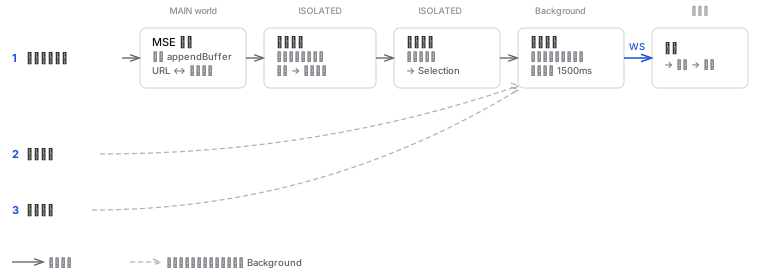
The video download button walks the full pipeline (MSE probe → attribution engine → site policy → resource cache → desktop). Download takeover and external extensions skip page media identification and enter directly from Background.
From Click to Download
Clicking the Download Button on a Video
This is the most complex entry. The extension must solve a core problem: a page may have multiple videos (feeds, short videos) that share network requests, and modern players use blob: URLs to hide the real media address. The extension must figure out "which video the user clicked, and what its real download address is."
The three-layer pipeline runs in three different execution contexts:
MSE Probe (MAIN world)
A script injected into the page's JS context that intercepts media-related APIs: createObjectURL, addSourceBuffer, appendBuffer, fetch, XMLHttpRequest.
MSE players (YouTube, Douyin, Instagram, etc.) feed data to <video> in segments via the MediaSource API. The probe records every appendBuffer call, building evidence of "which <video> consumed which network requests", and sends it to the ISOLATED world via postMessage.
Must run in the MAIN world; the ISOLATED world's content script cannot access the page's MediaSource instances.
Attribution Engine (ISOLATED world)
For each <video> element, maintain a session that tracks all URLs associated with that element. URL attribution has two levels:
- Temporary attribution: inferred from heuristics such as video ID in the URL, time order, or "the page has only one video"
- Locked attribution: the MSE probe has confirmed that a session's
SourceBufferconsumed data from a URL; irreversible
In feed scenarios (Douyin, Instagram Reels), the browser prefetches the next video's data. Prefetched URLs are initially temporarily attributed to the current video's session. When the next video's <video> element appears and completes MSE binding, the attribution engine reclaims these URLs and locks them to the correct session.
When the user clicks the download button, the attribution engine generates a read-only snapshot of the current session and hands it to the site policy.
Site Policy (ISOLATED world)
Dispatch by domain to the corresponding policy function. Each policy receives a session snapshot (read-only) and returns a Selection:
| Site | Policy | Reason |
|---|---|---|
| YouTube | Hand the page URL to desktop yt-dlp | YouTube's encrypted signed URLs cannot be directly re-downloaded by the extension |
| Douyin | Distinguish video track / audio track / full file by URL path markers; look up prefetched URLs across sessions by modal_id | Prefetched URLs may still be attributed to the previous video's session |
| X (Twitter) | Select only the HLS master playlist; filter adjacent tweets by the poster's media ID | Variant playlists are single-track (only video or only audio) |
Decode the base64-encoded efg parameter in the URL to extract track role and bitrate; scrape CDN links from the page's <script> tags | The adaptive player only requests the current quality; <script> contains higher-bitrate versions | |
| Generic | Priority: stream URL → full file → split-track merge | Fallback, covers unknown sites |
Sending to the Desktop
The Selection goes from the content script to the background (Service Worker). The background uses the URL to query the resource cache, supplementing metadata such as request headers, file size, and Range support.
On cache miss, wait 1500ms; the webRequest listener may not have recorded a response for this URL yet. If still missing, generate a resource with zero metadata and let the desktop do Range probing itself.
For merged downloads (video + audio split tracks), query both resources in parallel. Finally send via WebSocket to the desktop, entering the flow described in Architecture Overview: parse → draft/direct → enqueue → schedule.
Download Takeover
When the user clicks a normal download link (e.g. a .zip file) in the browser, the extension intercepts the browser's default download behavior.
| Chrome | Firefox | |
|---|---|---|
| Trigger event | onDeterminingFilename | onCreated |
| Filename | Available | None |
| Handling | Block default download | Clear download record |
Before intercepting, checks: takeover switch → URL protocol (http/https only) → domain filter → extension filter → minimum size filter.
After passing the filter, cancel the browser download, supplement metadata from the resource cache, and send the download request. Hold Ctrl to skip interception.
Draft Confirmation
When the video download button is triggered, draft is set automatically by the extension; for download takeover, draft depends on user settings; manually pasted URLs go to the draft by default.
The confirmation window shows the Task returned by the parser: format selection (YouTube's quality list), file checkboxes (multi-file Tasks), download path. After user confirmation, the Task is officially enqueued.